

PDF Arranger
Read our comprehensive review of PDF Arranger for Linux. Discover how this lightweight tool simplifies document merging, page rotation, and cropping.
Streamline Your Document Workflow with PDF Arranger
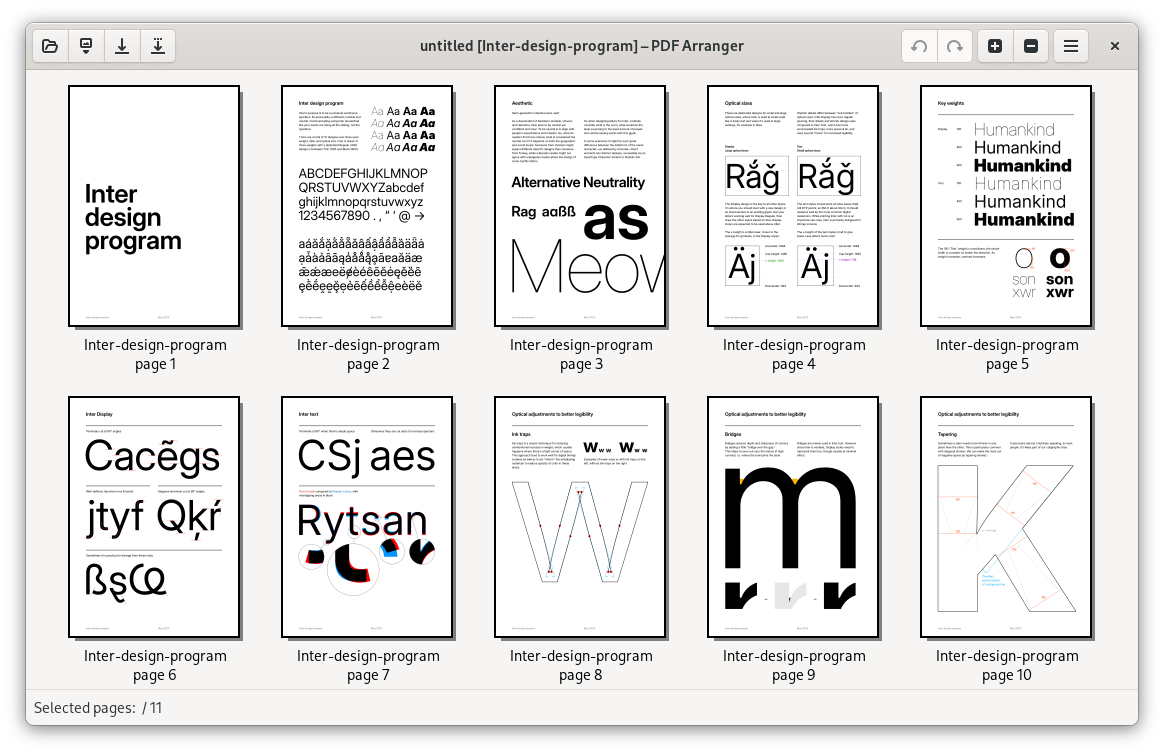
PDF Arranger for PDF modification is a lightweight, open-source Linux utility designed to take the headache out of document management. If you have ever struggled with a scanned document that saved upside down, or needed to merge multiple reports into a single file quickly, this application offers a refreshingly simple, visual solution. Operating as a highly intuitive graphical frontend for the powerful pikepdf library, it eliminates the need for complex command-line tools when executing basic document edits.
Key Features of PDF Arranger
Despite its minimal footprint, the application provides all the essential tools required for rapid document assembly. Here is what you can accomplish within its clean graphical interface:
- Seamless Merging and Splitting: Combine multiple files into one cohesive document, or extract specific pages to create smaller, targeted files.
- Interactive Page Rearrangement: Drag and drop individual pages to reorder them exactly how you need.
- Precise Rotation and Cropping: Fix orientation issues instantly by rotating pages, or crop margins to focus on essential content.
- Intuitive Graphical Interface: Visual thumbnails allow you to see exactly what you are modifying in real time.
Who Is This Tool For?
Developed by The PDF Arranger team, this software is specifically tailored for Linux users who require a fast, distraction-free tool for daily document curation. It is an excellent fit for professionals handling financial records, students compiling research papers, or anyone who wants a straightforward utility without the bloat of heavy PDF editing suites.
Why It Stands Out
While many PDF tools are either overly complex or command-line only, this software bridges the gap perfectly. By utilizing pikepdf under the hood, it ensures that your document modifications are executed quickly and without degrading the original file quality. It does one job—helping you structure your documents—and does it exceptionally well.
Get Started with PDF Arranger
If you are looking for an efficient, visual way to manage your files on Linux, this utility is highly recommended. To explore its features and integrate it into your workflow, visit the official PDF Arranger page on Flathub today.